
Programmierbare Controller
Produkte filtern

Das Starter Kit führt in die Grundlagen der Verwendung des Arduino ein. Sie werden durch den Aufbau mehrerer kreative Projektegeführt. Das Kit enthält eine Auswahl der häufigsten und nützlichsten elektronischen Bauteile, welche in einem Buch mit15 Projekten dargestellt werden. Starten Sie in die Grundlagen der Elektronik, lernen sie die physische Welt mit Sensoren und Aktoren zu steuern und entwickeln sie komplexere Projekte . Das Kit wird Ihnen dabei helfen. Anzahl der Bits: 8bit Prozessorarchitektur: AVR Prozessorserie: AVR Merkmale: Arduino Projektbuch, Steckplatine, 134 Komponenten/Sensoren, Servomotor Lieferumfang des Kits: Arduino UNO-Board, Steckplatine & Überbrückungsdrähte, USB-Kabel Prozessorfamilie: ATmega Prozessorhersteller: Atmel Prozessorkern: ATmega328 SVHC: No SVHC (17-Dec-2014)
Sofort verfügbar, Lieferzeit: 1-2 Tage

Uno The UNO is the best board to get started with electronics and coding. If this is your first experience tinkering with the platform, the UNO is the most robust board you can start playing with. The UNO is the most used and documented board of the whole Arduino family. Produktübersicht Arduino Uno is a microcontroller board based on the ATmega328P (datasheet). It has 14 digital input/output pins (of which 6 can be used as PWM outputs), 6 analog inputs, a 16 MHz quartz crystal, a USB connection, a power jack, an ICSP header and a reset button. It contains everything needed to support the microcontroller; simply connect it to a computer with a USB cable or power it with a AC-to-DC adapter or battery to get started.. You can tinker with your UNO without worring too much about doing something wrong, worst case scenario you can replace the chip for a few dollars and start over again. "Uno" means one in Italian and was chosen to mark the release of Arduino Software (IDE) 1.0. The Uno board and version 1.0 of Arduino Software (IDE) were the reference versions of Arduino, now evolved to newer releases. The Uno board is the first in a series of USB Arduino boards, and the reference model for the Arduino platform; for an extensive list of current, past or outdated boards see the Arduino index of boards. Technische Spezifikationen Microcontroller ATmega328P Operating Voltage 5V Input Voltage (recommended) 7-12V Input Voltage (limit) 6-20V Digital I/O Pins 14 (of which 6 provide PWM output) PWM Digital I/O Pins 6 Analog Input Pins 6 DC Current per I/O Pin 20 mA DC Current for 3.3V Pin 50 mA Flash Memory 32 KB (ATmega328P) of which 0.5 KB used by bootloader SRAM 2 KB (ATmega328P) EEPROM 1 KB (ATmega328P) Clock Speed 16 MHz LED_BUILTIN 13 Length 68.6 mm Width 53.4 mm Weight 25 g
Sofort verfügbar, Lieferzeit: 1-2 Tage

Learn electronics and get started with programming in your classroom step-by-step. No experience necessary. LESSONS Getting Started ( 30 mins). In this lesson the students get familiar with the kit´s material. Learn about electrical safety, how to setup the software and create their first program. Lesson 1 - Electricity Fundamentals (90 mins). In this lesson the students explore some of the basic concepts of electricity and build their first simple circuit while learning about the components that make up the circuit. Lesson 2 - Ohm's Law ( 90 mins). The students explore one of the physical laws that determine how electricity behaves in a circuit: Ohm's Law . They will learn, by building, the difference between parallel and series circuits and will investigate how electrical measurements behave using a multimeter as a tool. Lesson 3 - Traffic Signals (90 mins). In this lesson, students are introduced to the Arduino Software (IDE) and program their first light circuit that controls how the circuit operates. Lesson 4 - Dimmer Switch (90 mins). The students learn about the potentiometer and how they can be used manually to control a circuit. As a result, they will build an LED circuit where the Arduino board will control the brightness of the LEDs based on the position of the potentiometer. As the students code their circuit they will be introduced to concepts such as variables, conditional statements and serial communication. Lesson 5 - Project Holiday Lights ( 90 mins). The students will complete an open-ended project to design, build and program their own holiday light circuit. The project must follow the project's objectives, criterias and constraints. Lesson 6 - Sports Robot ( 90 mins). In this lesson, the students will learn how to use a servo motor to create a simple sports robot. They will program the robot to hit, kick or throw a ball. Lesson 7 - Windshield wipers (90 mins). This lesson introduces new programming concepts to the students such as nested conditionals, switch-case structures, and loops. The students learn the new concepts by programming and building a windshield wiper circuit. Lesson 8 - Musical Keyboard ( 90 mins). In this lesson, students learn about piezo buzzers and how to produce different sounds, tones and music. With that understanding, the student will build and code a musical keyboard. Lesson 9 - Light Wave Radar (90 mins). Students will use their Arduino board and a phototransistor to measure the intensity of the light and will learn the basic principle about how information is transmitted through light waves. Lesson 10 - Project Greenhouse Control System (180 mins). The students will complete an open-ended project to design, build and program a climate-control system for a greenhouse. The project must follow the project's objectives, criterias and constraints. ABOUT Teach middle school students the basics of programming, coding, and electronics. No prior knowledge or experience is necessary as the kits guide you through step-by-step, you are well-supported with teacher guides, and lessons can be paced according to your students’ abilities. You can integrate the kit throughout the curriculum, giving your students the opportunity to become confident in programming and electronics with guided sessions and open experimentation. You’ll also be teaching them vital 21st-century skills such as collaboration and problem-solving. The Arduino Education Starter Kit contains all the hardware and software you need for eight students (in groups of 2). You get step-by-step-lessons, teacher notes, exercises, and for a complete and in-depth class experience there’s also extra optional resources including activities, concepts, history, and interesting facts. The online platform contains the teacher content, nine 90-minute lessons, and two open-ended group projects that teach students coding and electronics. Each lesson builds off the previous one, giving students a further opportunity to apply the skills and concepts they have already learned. Students also get an engineering logbook that they complete as they work through the lessons. The beginning of each lesson provides an overview, estimated completion times, and learning objectives. Throughout each lesson, there are teacher notes and information that help the lesson go smoothly. Extension ideas are provided at the end of each lesson. WHAT'S IN THE KIT? The kit comes with several parts and components that students will use to build circuits as they complete lessons and projects throughout the course. Here is a brief description of what is included in the kit: Access code to exclusive online content including teachers’ guidance notes, step-by-step lessons and extra materials such as resources, invention spotlights and PDF logbooks for students and teachers. 4 Arduino UNO rev 3 4 Starter Kit mounting base Easy-to-assemble plastic base 4 Battery Snap 9v 8 Batteries 9v 4 Breadboard 400 points 4 Capacitor – 100uF 4 Female-male Jumper Wires (red) 4 Female-male Jumper Wires (black) 20 LEDs (red) 20 LEDs (green) 20 LEDs (yellow) 20 LEDs (blue) 4 Multimeters 4 Piezo Buzzer [PKM17EPP-4001-B0] 4 Phototransistors 8 Potentiometer 10kOhms 20 Push Button 4 Resistors - 1 kOhms 20 Resistors - 10 kOhms 20 Resistors - 220 Ohms 20 Resistors - 560 Ohms 70 Jumper Wires 4 Stranded jumper wires (red) 4 Servo Motor 4 Temperature sensor [TMP36] 4 USB Cable 12 M 3 Screw 12 M3 Bolts
Sofort verfügbar, Lieferzeit: 1-2 Tage

Der Arduino GIGA R1 WiFi wurde für ambitionierte Maker entwickelt. Es bietet die Möglichkei für Gamer, Künstler, Sounddesigner und jeden, der mit großen Ideen und kleinem Budget in die Tech-Welt einzusteigen - weil es fortschrittliche Funktionen in ein handliches Board packt, mit dem gleichen Formfaktor wie die beliebten Mega und Due. Funktionalität des Boards: Mikrocontroller (STM32H747XI): Dieser Dual-Core-Mikrocontroller mit 32 Bits ermöglicht es Ihnen, zwei Prozessoren miteinander kommunizieren zu lassen (einen Cortex®-M7 mit 480 MHz und einen Cortex®-M4 mit 240 MHz). Sie können sogar Micropython auf dem einen und Arduino auf dem anderen ausführen. Drahtlose Kommunikation (Murata 1DX): Egal, ob Sie Wi-Fi® oder Bluetooth® bevorzugen, der GIGA R1 WiFi bietet Ihnen alles. Sie können sich sogar schnell mit der Arduino IoT Cloud verbinden und Ihr Projekt aus der Ferne verfolgen. Und wenn Sie sich Sorgen um die Sicherheit der Kommunikation machen, hat der ATECC608A alles unter Kontrolle. Hardware-Anschlüsse und Kommunikation: In Anlehnung an den Arduino Mega und den Arduino Due verfügt der GIGA R1 WiFi über 4 UARTs (serielle Hardware-Ports), 3 I2C-Ports (1 mehr als bei den Vorgängern), 2 SPI-Ports (1 mehr als bei den Vorgängern), 1 FDCAN. GPIOs und zusätzliche Pins: Es sollte der gleiche Formfaktor des Mega und des Due beibehalten werden, so dass Sie Ihre kundenspezifischen Shields leicht an das GIGA R1 WiFi anpassen können (denken Sie aber daran, dass dieses Board mit 3,3V arbeitet!), und wir haben zusätzliche Header hinzugefügt, um auf zusätzliche Pins zuzugreifen, so dass die Gesamtzahl der GPIO-Pins 76 beträgt, und das Beste daran ist, dass Sie von unten darauf zugreifen können, so dass Sie Ihr Projekt so belassen können, wie es ist, und einfach darüber nachdenken, wie Sie es erweitern können. Außerdem haben wir zwei neue Pins hinzugefügt: einen VRTC, an den man eine Batterie anschließen kann, um die RTC weiterlaufen zu lassen, während das Board ausgeschaltet ist, und einen OFF-Pin, mit dem man das Board abschalten kann. Steckverbinder: Das GIGA R1 WiFi hat zusätzliche Anschlüsse auf dem Board, die die Erstellung Ihres Projekts ohne zusätzliche Hardware erleichtern. Dieses Board hat: • USB-A-Anschluss für den Anschluss von USB-Sticks, anderen Massenspeichern und HID-Geräten wie Tastatur oder Maus. • 3,5-mm-Eingangs-/Ausgangsbuchse für den Anschluss an DAC0, DAC1 und A7. • USB-C® zur Stromversorgung und Programmierung des Boards sowie zur Simulation eines HID-Geräts wie Maus oder Tastatur. • Jtag-Anschluss, 2x5 1,27mm. • 20-poliger Arducam-Kamerastecker. Unterstützung höherer Spannungen: Im Vergleich zu seinen Vorgängern, die bis zu 12 Volt unterstützen, kann das GIGA R1 WiFi einen Bereich von 6 bis 24 Volt verarbeiten.
Sofort verfügbar, Lieferzeit: 1-2 Tage

Mega 2560 The MEGA 2560 is designed for more complex projects. With 54 digital I/O pins, 16 analog inputs and a larger space for your sketch it is the recommended board for 3D printers and robotics projects. This gives your projects plenty of room and opportunities. Produktübersicht The Arduino Mega 2560 is a microcontroller board based on the ATmega2560. It has 54 digital input/output pins (of which 15 can be used as PWM outputs), 16 analog inputs, 4 UARTs (hardware serial ports), a 16 MHz crystal oscillator, a USB connection, a power jack, an ICSP header, and a reset button. It contains everything needed to support the microcontroller; simply connect it to a computer with a USB cable or power it with a AC-to-DC adapter or battery to get started. The Mega 2560 board is compatible with most shields designed for the Uno and the former boards Duemilanove or Diecimila. The Mega 2560 is an update to the Arduino Mega, which it replaces. Technische Spezifikationen Microcontroller ATmega2560 Operating Voltage 5V Input Voltage (recommended) 7-12V Input Voltage (limit) 6-20V Digital I/O Pins 54 (of which 15 provide PWM output) Analog Input Pins 16 DC Current per I/O Pin 20 mA DC Current for 3.3V Pin 50 mA Flash Memory 256 KB of which 8 KB used by bootloader SRAM 8 KB EEPROM 4 KB Clock Speed 16 MHz LED_BUILTIN 13 Length 101.52 mm Width 53.3 mm Weight 37 g
Voraussichtlich wieder verfügbar ab: 02.11.2026

CTC steht für Creative Technologies in the Classroom. Das CTC-Lernkonzept verfolgt den Ansatz, dass sich Lehrende und Lernende gemeinsam das benötigte Know-how erarbeiten. Mit seinen Modulen können unterschiedliche Themen der Mathematik, Informatik, Naturwissenschaften und Technik erforscht werden. Das CTC GO! bildet das Herzstück der CTC-Reihe. Ein Kit besteht unter anderem aus 8 Arduino UNO WiFi Rev2 Boards mit integrierter inertialer Messeinheit und WiFi-Verbindung. Kompatibel dazu gibt es 8 Add-on Platinen, die speziell für den bildungstechnischen Bereich entwickelt wurden. Mit diesem Kit können 16 bis 24 Arduino Einsteiger acht spannende Projekte durchführen. Diese Projekte sind durch 8 Lerneinheiten begleitet. Nachdem die Grundlagen vermittelt wurden, kann man mit unterschiedlichen Erweiterungen sein Wissen erweitern. Die erste Erweiterung erscheint im ersten Quartal 2020. Weitere Erweiterungspakete zu den Themen Bewegung, Robotik, Mathematik, Weltraum, Naturwissenschaften und kabellose Technologien folgen. Inhalt: 8 x Arduino UNO WiFi Rev2 Boards 8 x Arduino Education Shields (verfügt über einen SD-Kartenleser und einen Audioanschluss) 2 x Breadboards Satz von elektronischen Komponenten wie Widerstände, LEDs, Taster und Piezo Sensoren: Einschließlich Potentiometer, Licht- und Ultraschallsensoren 8 x 9V-Batterien und zwei Batterieanschlüssen für jede davon Inklusive aller benötigten Verbindungskabel und USB-Kabel Enthalten sind alle modularen Bauteile, die für den Bau von 8 verschiedenen Leitprojekten benötigt werden Mit den Sets können jeweils 2 bzw. 3 Lernende arbeiten. Sie enthalten alle Komponenten, die für die Experimente benötigt werden. Inklusive Ersatzteilset
Sofort verfügbar, Lieferzeit: 1-2 Tage
If you’ve taken your students through the CTC GO! - Core Module, the Motions Expansion Pack will build on what they have already learned about how to use technology as a tool and how to apply that knowledge in the real world. The Motions Expansion Pack challenges students to go a step further in computing and design and technology by introducing them to new and more complex programming concepts that develop their logical reasoning, computational thinking, and problem-solving skills. As an educator, you’ll still get all the teaching support you need with webinars, videos, guides, and direct contact with an expert. What Does Every Module Include? TOOLBOX: All the specific motions components and materials you need to build several guided experiments and projects in addition to the Core Module components. SOFTWARE PLATFORM FOR EDUCATORS with all the materials you need for each lesson, resources to help you with lesson preparation, content tips, timing suggestions for classroom management, and curriculum links SOFTWARE PLATFORM FOR PUPILS with step-by-step instructions, assembly videos, and fun activities to help them get started with programming, electronics and building fully-functional, interactive projects (educators also have prior access to this platform so they can prepare and adapt their lesson plans) TRAINING AND SUPPORT including a welcome training webinar with an Arduino Education expert, training videos that explain each lesson’s concepts, shorter videos that expand on lesson content, and direct email support from an education expert. This expansion pack includes 14 learning sessions: - 7 Guided sessions: 4 Guided activities lessons to learn how to start working with motors and 3 Guided project-building sessions to apply the acquired knowledge - 7 Self-guided project-building sessions
Nicht Lagernd
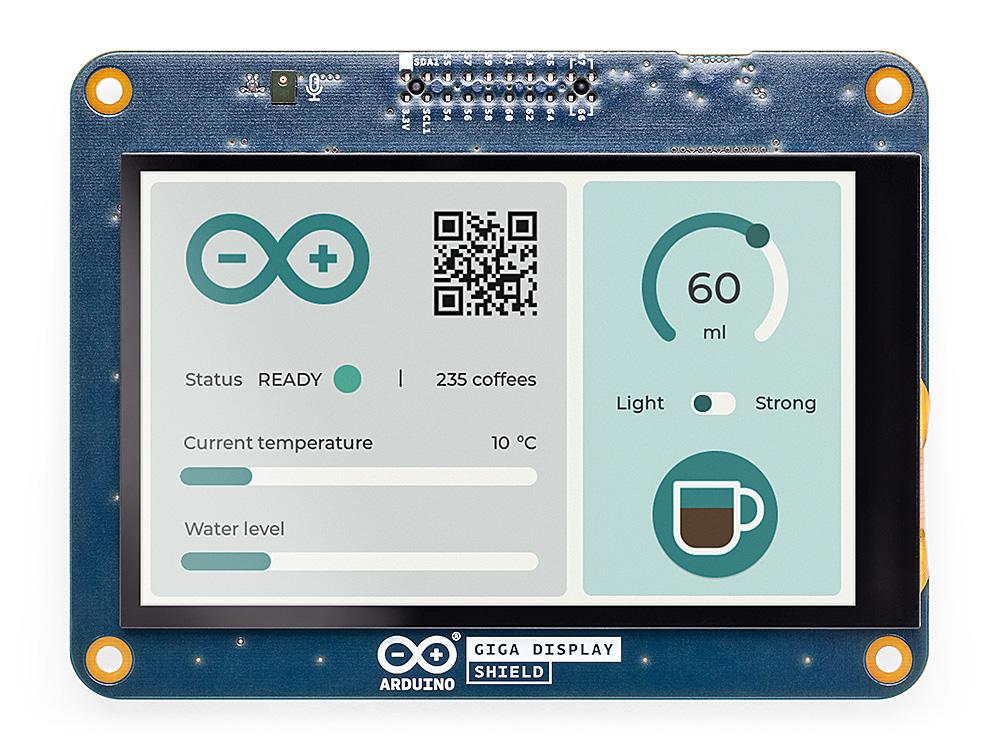
Das GIGA Display Shield ist eine Touchscreen-Lösung, mit der Sie mühelos grafische Schnittstellen in Ihren Projekten insbesondere mit dem GIGA R! WIFI Board einsetzen können. Durch die Nutzung des neuen Stiftleistenanschlusses in der Mitte des GIGA R1 WiFi bietet dieses Shield eine nahtlose Integration und erweiterte Funktionalitäten. Mit dem GIGA Display Shield erhalten Sie Zugang zu einer Reihe von Funktionen, darunter ein digitales Mikrofon, eine 6-Achsen-IMU und ein Arducam-Anschluss. Mit diesen zusätzlichen Funktionen können Sie die anderen 54 verfügbaren Pins voll ausnutzen, was die Erstellung von Handheld-Geräten oder Dashboards zur Steuerung Ihres Projekts unglaublich bequem macht. Dank des benutzerfreundlichen Designs und der umfassenden Funktionen des GIGA Display Shields können Sie mit Leichtigkeit intuitive Schnittstellen erstellen. Verbessern Sie die Funktionalität und Benutzerfreundlichkeit Ihres Projekts mit dieser innovativen Lösung.
Sofort verfügbar, Lieferzeit: 1-2 Tage

Learn the basics of programming, coding and electronics including current, voltage, and digital logic. No prior knowledge or experience is necessary as the kit guides you through step by step. The Arduino Student kit comes with several parts and components that will be used to build circuits while completing the lessons and projects throughout the course. Here is a brief description of what is included in the kit: Access code to exclusive online content including learning guidance notes, step-by-step lessons and extra materials such as resources, invention spotlights and a digital logbook with solutions. - 1 Arduino Uno - 1 USB cable - 1 Board mounting base - 70 Solid core jumper wires - 1 Multimeter - 1 9V battery snap - 1 9V battery - 20 LEDs (5 red, 5 green, 5 yellow & 5 blue ) - 5 Resistors 560 Ohm - 5 Resistors 220 Ohm - 1 Breadboard 400 points - 1 Resistor 1k Ohm - 1 Resistor 10k Ohm - 1 Small Servo motor - 2 Potentiometers 10k Ohm - 2 Knob potentiometers - 2 Capacitors 100uF - Solid core jumper wires - 5 Pushbuttons - 1 Phototransistor - 2 Resistors 4.7k Ohm - 1 Jumper wire black - 1 Jumper wire red - 1 Temperature sensor - 1 Piezo - 1 Jumper wire female to male red - 1 Jumper wire female to male black - 3 Nuts and Bolts Learn the basics of programming, coding and electronics, including current, voltage and digital logic. No prior knowledge or experience is necessary as the kit guides you through step by step. You’ll get all the hardware and software you need for one person, making it ideal to use for remote teaching, homeschooling, and for self-learning. There are step-by-step lessons, exercises, and for a complete and in-depth experience, there’s also extra content, including invention spotlights, concepts, and interesting facts about electronics, technology, and programming. Lessons and projects can be paced according to individual abilities, allowing them to learn from home at their own level. The kit can also be integrated into different subjects such as physics, chemistry, and even history. In fact, there’s enough content for an entire semester. How educators can use the kit for remote teaching The online platform contains all the content you need to teach remotely: exclusive learning guidance content, tips for remote learning, nine 90-minute lessons, and two open-ended projects. Each lesson builds off the previous one, providing a further opportunity to apply the skills and concepts students have already learned. They also get a logbook to complete as they work through the lessons. The beginning of each lesson provides an overview, estimated completion times, and learning objectives. Throughout each lesson, there are tips and information that will help to make the learning experience easier. Key answers and extension ideas are also provided. How the kit helps parents homeschool their children This is your hands-on, step-by-step remote learning starter kit that will help your child learn the basics of programming, coding, and electronics at home. As a parent, you don’t need any prior knowledge or experience as you are guided through step-by-step. The kit is linked directly into the curriculum so you can be confident that your children are learning what they should be. The kit additionally provides an opportunity for them to become confident in programming and electronics. You’ll also be helping them to acquire vital skills like critical thinking and problem-solving. Self-learning with the Arduino Student Kit Students can use this kit to introduce themselves to the basics of electronics, programming, and coding. As all the lessons follow step-by-step instructions, it’s straightforward for them to work their way through and learn on their own. The students can work at their own pace, have fun with all the real-world projects, and increase their confidence as they go. They don’t require any previous knowledge as everything is clearly explained, coding is pre-written, and there’s a vocabulary of concepts to refer to.
Sofort verfügbar, Lieferzeit: 1-2 Tage

Nano The Arduino Nano is a compact board similar to the UNO. Produktübersicht The Arduino Nano is a small, complete, and breadboard-friendly board based on the ATmega328 (Arduino Nano 3.x). It has more or less the same functionality of the Arduino Duemilanove, but in a different package. It lacks only a DC power jack, and works with a Mini-B USB cable instead of a standard one. Technische Spezifikationen Microcontroller ATmega328 Architecture AVR Operating Voltage 5 V Flash Memory 32 KB of which 2 KB used by bootloader SRAM 2 KB Clock Speed 16 MHz Analog IN Pins 8 EEPROM 1 KB DC Current per I/O Pins 40 mA (I/O Pins) Input Voltage 7-12 V Digital I/O Pins 22 (6 of which are PWM) PWM Output 6 Power Consumption 19 mA PCB Size 18 x 45 mm Weight 7 g Product Code A000005
Sofort verfügbar, Lieferzeit: 1-2 Tage
Neue Lieferung erwartet ab: 27.10.2026
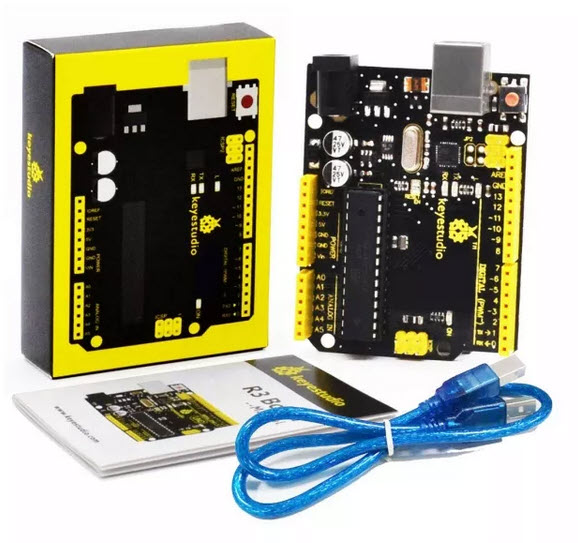
KEYESTUDIO UNO R3 is a microcontroller board based on the ATmega328. It has 14 digital input/output pins (of which 6 can be used as PWM outputs), 6 analo g inputs, a 16 MHz ceramic resonator, a USB connection, a power jack, an ICSP header, and a reset button. It contains everything needed to support the microcontroller; simply connect it to a computer with a USB cable or power it with a AC-to-DC adapter or battery to get started. The Uno R3 differs from all preceding boards in that it does not use the FTDI USB-to-serial driver chip. Instead, it features the Atmega16U2 programmed as a USB-to-serial converter. Package includes: 1 x UNO R3 Development Board 1 x USB Cable
Sofort verfügbar, Lieferzeit: 1-2 Tage
Take your first steps in building internet-connected devices. Make a complex subject simple, and explore the Internet of Things with Arduino Education. Inhalt: - 1x Arduino MKR1010 Board - 1x MKR IoT Carrier designed for this kit, including: - Two 24 V relays - SD card holder - Five Tactile buttons - Plug and play connectors for different sensors - Temperature sensor - Humidity sensor - Pressure sensor - RGBC, Gesture and Proximity - IMU - RGB 1.20” display - 18650 Li-Ion rechargeable battery holder - Five RGB LEDs - Plastic encasing - Micro USB Kabel - Feuchtigkeitssensor - Bewegungssensor PIR - Plug-and-play Kabel für alle Sensoren
Sofort verfügbar, Lieferzeit: 1-2 Tage
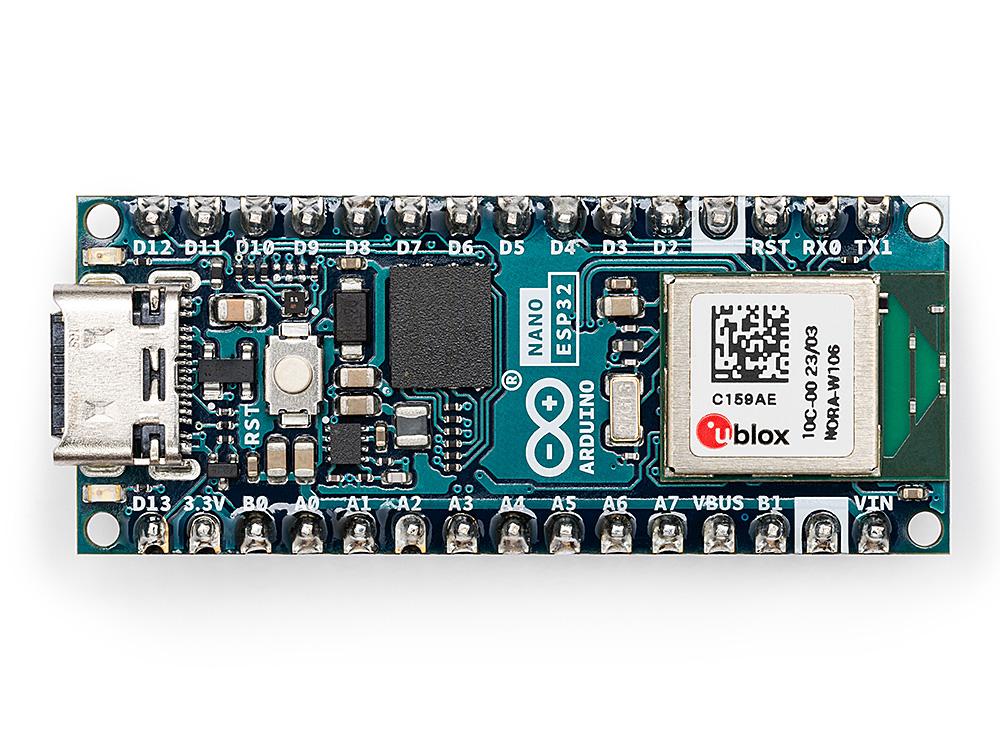
Arduino® Nano ESP32 WITH HEADERS Dieses Board bietet die ganze Leistung des bekannten ESP32-S3 mit der vollständigen Integration des Arduino-Ökosystems und ermöglicht es den Entwicklern, die Welt von Arduino und MicroPython ohne Einschränkungen zu erkunden. Lassen Sie Ihrer Kreativität freien Lauf und beginnen Sie mit dem Bau Ihres nächsten IoT-Projekts. Merkmale Arduino® Nano ESP32: Formfaktor des bekannten Arduino® Nano-Formfaktor und PIN kompatibel. Wi-Fi® und Bluetooth® on Borad: Nutzen Sie die Leistung des im IoT-Bereich bekannten ESP32-S3-Mikrocontrollers mit vollständiger Arduino-Unterstützung für drahtlose und Bluetooth®-Konnektivität. Arduino- und MicroPython-Unterstützung: Wechseln Sie nahtlos zwischen Arduino- und MicroPython-Programmierung mit ein paar einfachen Schritten. Arduino IoT Cloud-kompatibel: Erstellen Sie schnell und einfach IoT-Projekte mit nur ein paar Zeilen Code. Unser Setup kümmert sich um die Sicherheit und ermöglicht es Ihnen, Ihr Projekt von überall aus mit der Arduino IoT Cloud App zu überwachen und zu steuern. (Verfügbar ab August 2023) HID-Unterstützung: Emulieren Sie Geräte mit menschlicher Schnittstelle, wie Tastaturen oder Mäuse, über USB und eröffnen Sie sich so neue Möglichkeiten der Interaktion mit Ihrem Computer. Es gibt keine Ausreden mehr, um Ihre Erkundung von IoT und MicroPython aufzuschieben. Der Nano ESP32 bietet alles, was Sie brauchen, um mit der Entwicklung zu beginnen und die endlosen Möglichkeiten zu entdecken.
Nicht Lagernd
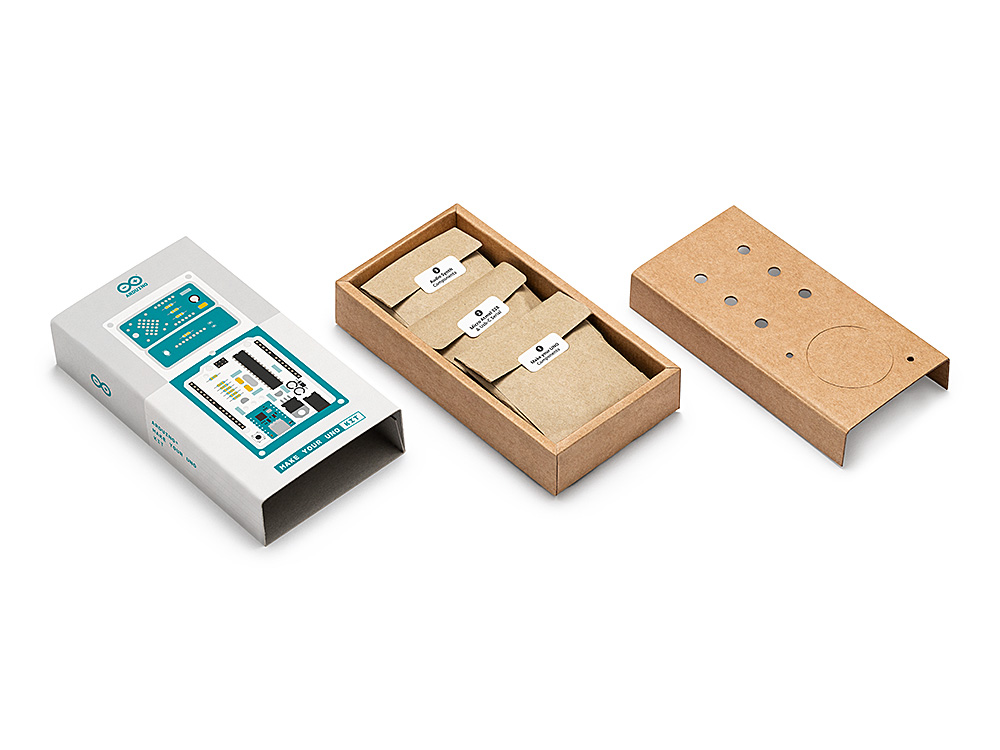
Löte Deinen Ardunino UNO selbst und baue daraus einen Synthesizer Lerne die Grundlagen der Elektronik, indem du deinen Arduino UNO von Hand zusammenbaust, mache dich mit dem Löten vertraut, während du jedes einzelne Bauteil montierst, und lasse dann deiner Kreativität freien Lauf mit dem einzigartigen Bausatz, der zu einem Synthesizer wird! Das Arduino Make Your UNO Kit ist wirklich der beste Weg, um das Löten zu lernen. Und wenn du fertig bist, kannst du mit der Verpackung einen Synthesizer bauen und deine Musik machen. Ein Bausatz mit allen Komponenten, um deinen eigenen Arduino UNO und einen Audio-Synthesizer-Schild zu bauen. In der Online-Schritt-für-Schritt-Anleitung lernst du, wie du deinen eigenen Arduino UNO und dein eigenes Audio-Synthesizer-Shield zusammenlötest. Am Ende hast du dein eigenes digitales Instrument gebaut, mit dem du coole Sounds erzeugen kannst. DIESER BAUSATZ ENTHÄLT: Arduino Make Your UNO 1 x Make Your UNO Leiterplatte 1 x USB C Serieller Adapter Platine 7 x Widerstände 1K Ohm 2 x Widerstände 10K Ohm 2 x Widerstände 1M Ohm 1 x Diode (1N4007) 1 x 16MHz Quarz 4 x Gelbe LEDs 1 x Grüne LED 1 x Taster 1 x MOSFET 1 x LDO (3,3V) 1 x LDO (5V) 3 x Keramikkondensatoren (22pF) 3 x Elektrolytkondensatoren (47uF) 7 x Polyester-Kondensatoren (100nF) 1 x Sockel für ATMega 328p 2 x I/O Steckerleisten 1 x Steckerleiste 6 Pins 1 x Barrel Klinkenstecker 1 x ATmega 328p Mikrocontroller Arduino Audio-Synthesizer 1 x Audio Synth PCB 1 x Widerstand 100k Ohm 1 x Widerstand 10 Ohm 1 x Audio-Verstärker (LM386) 1 x Keramik-Kondensatoren (47nF) 1 x Elektrolytkondensatoren (47uF) 1 x Elektrolytkondensatoren (220uF) 1 x Polyester-Kondensator (100nF) 4 x Anschlüsse Stiftleiste 6 x Potentiometer 10K Ohm mit Kunststoffknöpfen Ersatzteile 2 x Elektrolytkondensatoren (47uF) 2 x Polyester-Kondensator (100nF) 2 x Keramikkondensatoren (22pF) 1 x Taster 1 x Gelbe LEDs 1 x Grüne LED Mechanische Teile 5 x Abstandshalter 12mm 11 x Abstandshalter 6mm 5 x Schraubenmuttern 2 x Schrauben 12mm
Sofort verfügbar, Lieferzeit: 1-2 Tage